
Half Your Team Uses AI. So Why Hasn't Your Workflow Changed?
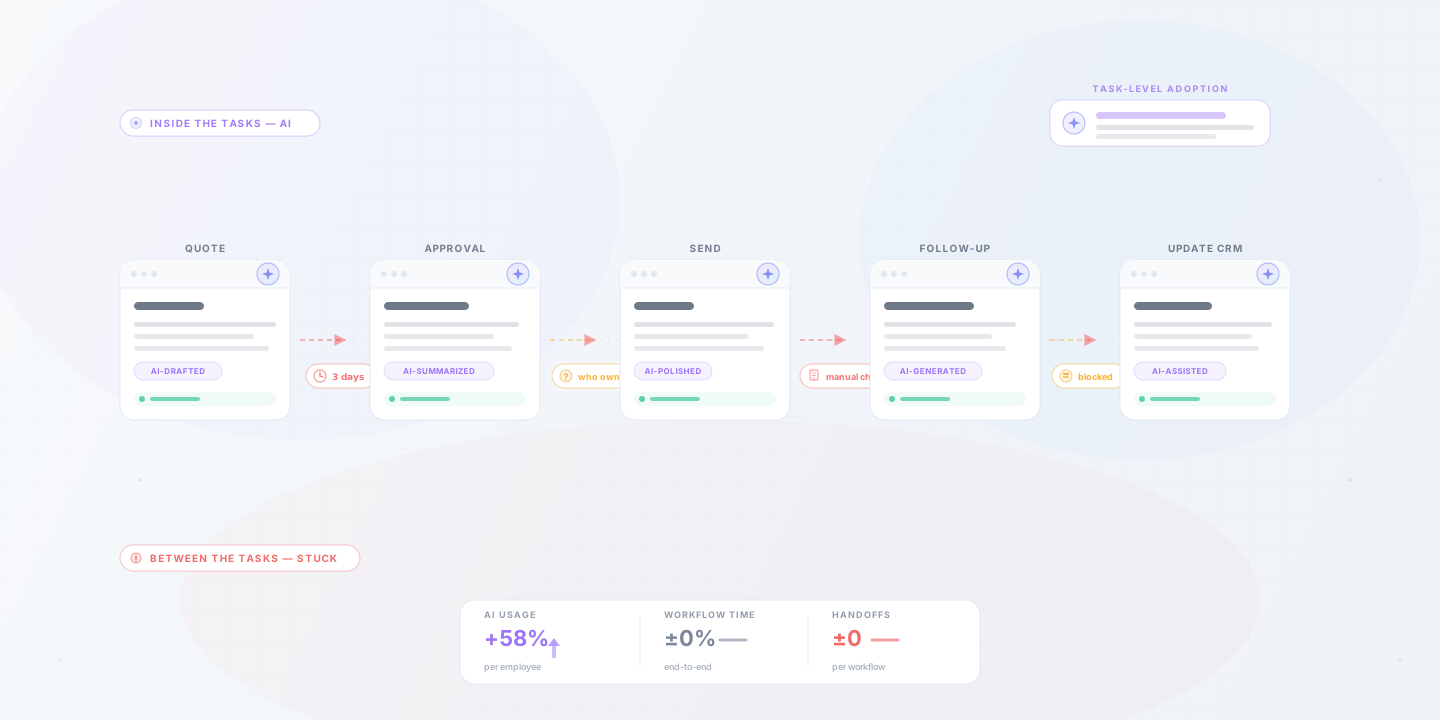
Your team drafts faster, summarizes calls, and cleans up spreadsheets with AI, yet quotes still sit and onboarding still lags. AI use at the task level doesn't change how work moves through the business. Fixing one painful workflow does.
Cloudfinch Team
Apr 17, 2026
If you run an operating business, you've probably noticed this already: your team uses AI for real work. In a February 2026 Gallup survey, half of US employees said they use AI in their role at least a few times a year.
They draft emails faster, clean up spreadsheets, summarize calls, write internal docs, and get to a decent first pass without much effort.
It looks like progress, but most workflows feel the same.
Quotes still sit. Onboarding still takes longer than it should. Reports still require someone to pull data manually. Approvals still depend on catching the right person at the right time. Finance still chases context.
Nothing critical has sped up. We see this often, and the reason is that AI use at the employee level does not change the workflow. It makes people slightly faster inside it.
Where things are getting misread
Many teams read rising AI use as a sign that operations are improving. It's an easy mistake: people are visibly working faster, the outputs are better, and some friction goes away at the task level.
But slow writing and bad drafts cause few operational bottlenecks. Most come from:
AI tools don't touch any of that. They help with the task and leave the system the task lives in as it was.
The pattern we keep seeing
In most companies, people use AI around the workflow rather than inside it.
Someone uses it to write a response, then checks a spreadsheet by hand, asks for approval, updates the CRM, and follows up when nothing moves.
The steps didn't change; only the effort inside one of them did. That's a better tool inside the same system, and if the system is where the delay lives, the outcome barely moves.
What slows work down
Break most workflows down and the delays are structural. People know what to do. The process depends on too many manual transitions:
That's why a lot of AI adoption feels underwhelming at the business level: the hard part was never the typing.
The bigger issue: nothing was removed
The most common mistake is adding AI without simplifying anything. The approvals, checks, handoffs, and reporting habits stay the same, and the team has one more tool.
Improvement usually comes from doing less:
Where workflows change
When a workflow improves, you don't need a dashboard to tell you. There's less chasing, less confusion, fewer "who's handling this?" messages, and fewer follow-ups to find out where things stand.
In practical terms:
That's when things start to feel different, because the system takes less effort to run.
A simple way to tell if anything improved
Instead of asking whether your team uses AI, ask:
If the answer is unclear, the workflow probably hasn't changed.
Where to focus
Instead of adding another tool, pick one workflow that is clearly painful and fix it properly. Usually it's something like:
Stop asking "how do we use more AI?" and ask "Where is work slowing down, and what would it take to make that flow better?"
Final thought
AI adoption is moving quickly; workflow change isn't. Giving people better tools is easy. Changing how work moves through a business is harder, and it's where most of the payoff is.
If the same work still depends on the same handoffs, approvals, and manual follow-ups, nothing meaningful has changed. You have more capable people working inside the same system, and closing that gap is still the biggest opportunity.
Ready to find the workflow where your business is losing time? Book a 30-minute call and we'll talk through your business, the software running it today, and which workflow is worth fixing first. If it makes sense to work together, you'll get a fixed-fee proposal within a week.